
 3 min read
“I gave my child an iPad for schoolwork, but the second I look away, they’re watching YouTube or playing Roblox…”
“Even with screen time limits in place, they somehow find ways around them.. Taking the tablet away turns into another argument.”
“When they rest their hand on the screen to write, it glitches, frustrating them so much that they give up after a few minutes.”
For many parents, the challenge isn’t the schoolwork itself. It’s keeping children focused and making sure the technology actually supports learning.
Why Standard Tablets Can Get in the Way of Learning
Using learning apps on a standard iPad or Android tablet comes with two major challenges: easy access to distractions and limited opportunities to engage deeply with the work.
1. The Limits of Parental Controls
Built-in parental controls aren’t foolproof. Children can find workarounds through browsers, hidden folders, or other loopholes, leaving parents to constantly monitor and manage their screen time.
2. When Learning Becomes “Tapping Only”
Many learning apps rely heavily on multiple-choice formats where children simply tap an answer. Because these apps rarely provide space to write out notes, they often try to calculate in their heads, leading to careless mistakes, or develop a habit of guesswork. Learning can become more about completing tasks rather than thinking through them.
Even when apps include a scratchpad feature, resting a hand on the screen causes unwanted marks or glitches. This ultimately discourages them from working through problems by hand.
Smile Zemi’s Focused Learning Environment with a Dedicated Device
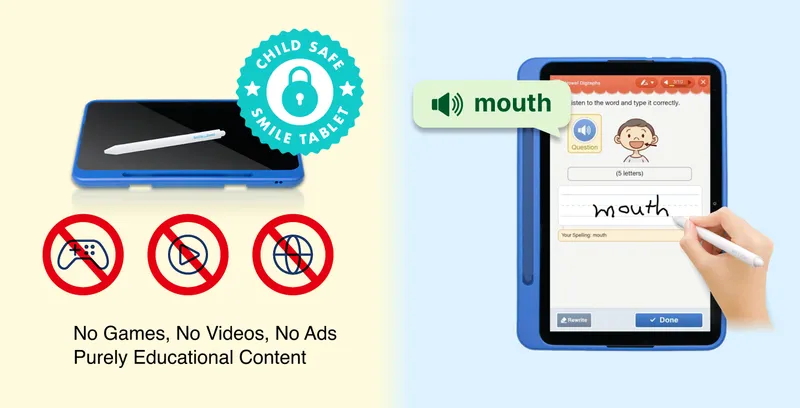
To eliminate digital distractions and overcome the limitations of touch-based learning, Smile Zemi uses a device designed from the ground up specifically for education.
1. 100% Distraction-Free by Design
Smile Zemi tablets have no app store, third-party app downloads, or web browser.
- No YouTube or external app downloads
- No distracting ads
Because it is a completely closed system, even tech-savvy children can’t find workarounds. Parents can spend less time monitoring the device and more time letting them focus on their lessons.
2. Rest Your Hand Naturally: Palm Rejection Technology That Feels Like Paper
Smile Zemi’s dedicated tablet features advanced palm rejection, allowing children to rest their hand naturally on the screen while writing. The tablet registers the stylus—not the palm—so writing feels much more like using a pencil and paper.
This allows them to focus on working through problems instead of dealing with glitches or discomfort.
3. Build Daily Habits: “Learn First, Play Later”
Designed to fit easily into busy schedules, Smile Zemi helps children to learn independently.
- Step 1: Start with Today’s Tasks: Turn on the tablet to see the lessons they need to complete that day.
- Step 2: Automated Grading & Hints: Solve problems on their own using step-by-step hints and video explanations.
- Step 3: Learn First, Play Later: Reward features (such as access to a free digital reading library) unlock only after all daily tasks are completed.
Eliminate Screen Time Battles and Keep Them Focused
Constant battles over distractions, parental controls, or frustrating technology can get in the way of learning before children even begin.
Smile Zemi’s dedicated device creates a distraction-free environment with a natural handwriting experience—helping children stay focused while giving parents greater peace of mind.
